Notes
Record a meeting in whatever languages are spoken in the room and get a structured note: summary, decisions, action items with owners, key dates. Documents and photos arrive from the phone's Share Sheet.
Record a meeting in any language and InferaNote writes the note, puts the action items on your agenda, and links the people, organisations and decisions into a knowledge graph you can ask questions of.
An ACIA project · AI layer by InferaStack · Invitation only
Each note is a node. The people, organisations, decisions, action items, dates and documents it mentions become nodes too, linked by a controlled vocabulary of relations. Ask a question and the answer is drawn across every meeting, with the exact moment in the recording it came from.
Everything you record feeds the same notes, the same assistant and the same graph.
Record a meeting in whatever languages are spoken in the room and get a structured note: summary, decisions, action items with owners, key dates. Documents and photos arrive from the phone's Share Sheet.
Ask by text or voice. Answers are grounded in your own notes and documents, and cite the moment in the recording they came from. It learns your vocabulary, so names and product terms improve over time.
People, organisations, decisions and dates linked across meetings, documents and web pages — every relation carrying its provenance, on an interactive canvas with a page per entity.
Record a meeting, or share a document or photo from your phone.
A structured note is written, action items land on the agenda, and the people, organisations and dates join the knowledge graph.
Ask the assistant by text or voice, publish a note to Notion, or export everything as Markdown.
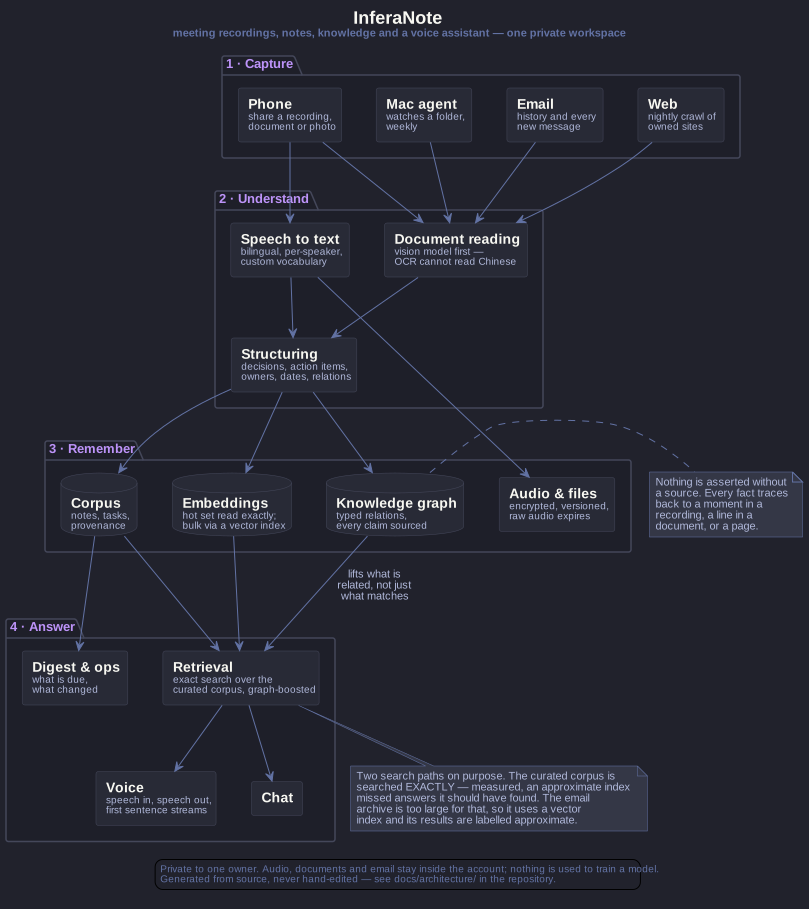
InferaNote is where InferaStack's applied AI runs as a whole system rather than a single model call: speech in any language, note generation, relation extraction, retrieval and voice, inside the customer's own AWS account.
InferaNote is the reference workload for the InferaStack product line. Its AI layer is built the way the InferaStack Gateway serves customers, routed to Amazon Bedrock resources in ACIA's own account. The Gateway itself is in development and not commercially released; the AI Grid is at proof of concept. What the page shows is the pattern working end to end on a real product, not a claim about either.
InferaNote for invited ACIA members, on Amazon Bedrock and Transcribe in ACIA's AWS account.
The Gateway pattern: one OpenAI-compatible interface, budgets and metering per key, an audit trail that stores metadata only.
A private GPU environment in a NEXTDC facility for organisations that cannot use Bedrock; placement on InferaStack AI Grid capacity once Stage 0 validation is complete; and the assistant and graph embedded in other vendors' products with per-tenant keys and budgets.
The AI layer inside ACIA's InferaNote is the reference. These are the services InferaStack offers organisations that want the same system as their own.
The whole InferaNote stack stood up in your own AWS account, delivered as a project. Your data stays in your account; the AI layer runs on Amazon Bedrock inside it.
Monitoring, model and prompt updates, cost caps, backup and restore and incident response, with an audit trail that stores metadata only. One point of contact.
One OpenAI-compatible endpoint, per-key budgets, metering and routing across models. Offered as design and integration now; as the InferaStack Gateway product once it is released.
Organisation-specific vocabularies, entity dictionaries and relation schemas, so a council, a clinic or a fund gets a graph shaped to its own world.
Connectors beyond Notion: Microsoft 365, Google Workspace, meeting platforms, CRMs and document systems, plus single sign-on and identity mapping.
Retention and deletion policies, access reviews, audit exports and residency documentation for regulated buyers, as a fixed-scope assessment and configuration.
A second brain is only useful if it is yours. These are the rules it runs under.
InferaNote runs inside the owner's AWS account: ACIA's for ACIA, yours for your organisation. The AI layer runs on Amazon Bedrock through InferaStack's stack, so the same system can be deployed as a private, sovereign notes platform for any customer that needs one.
Invited members only — ACIA members and designated users. No open registration, and no public content.
The whole corpus exports as plain Markdown with wiki-links, so nothing is locked in.
A note can be published to Notion. Nothing is read back from it.
InferaNote sits alongside InferaCard in ACIA's family of products. ACIA owns and operates its deployment; InferaStack provides the AI layer, uses the product as the working demonstration of its own stack, and can deploy the same system for other organisations inside their own AWS accounts.
ACIA's InferaNote is invitation only — ACIA members and designated users. The product page on acia.org.au carries the full feature inventory and the current architecture. If your organisation needs the same system in its own AWS account, talk to us about a sovereign InferaNote deployment.